
Picture a gadget smaller than a candy bar that lets you hear aircraft, weather satellites, shortwave broadcasts and local FM stations. That is the promise of software defined radio, and it costs far less than most newcomers expect. If you are searching for the best SDR software defined radio for beginners in 2026, this guide ranks seven trusted options, explains what each one does well, and shows what to buy alongside it, so you can start without wasting money or patience.
Beginners often feel lost among model names, frequency ranges and the difference between receiving and transmitting. This article removes that confusion with plain explanations, honest trade-offs and a practical setup routine. Where a price or specification may have changed, we say so, because a good buying decision depends on current information rather than a number that was correct months ago.
What a Software Defined Radio Actually Does
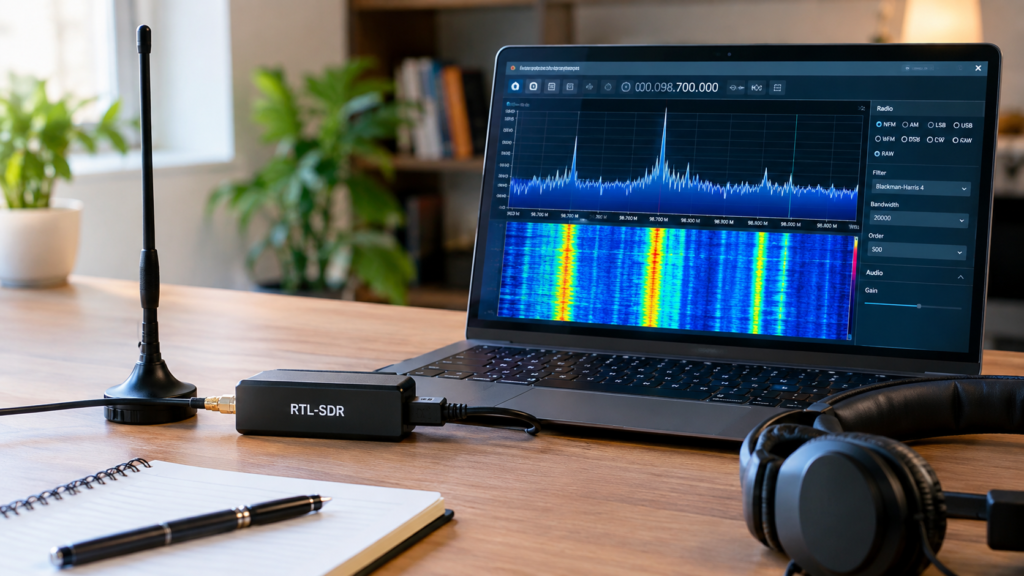
A software defined radio, or SDR, is a piece of hardware that captures radio waves and passes the raw signal to your computer. Software then handles tuning, filtering and decoding. Instead of turning a knob on a fixed device, you click across a colorful spectrum display and watch signals appear, strengthen and fade in real time. It feels less like operating a radio and more like exploring a map of invisible traffic.
This design separates an SDR from a traditional radio or scanner, whose functions are locked into its circuitry. A typical beginner setup is simple: an antenna, a small USB dongle and a computer running free software. Because the clever work happens in software, new features arrive through updates rather than new hardware, which is why students, hobbyists and curious tinkerers love the format so much.
What Beginners Can Do With an SDR
The easiest wins come first. You can listen to FM and AM broadcasts, explore shortwave stations from other continents, and track aircraft on a live map using ADS-B signals. With a suitable antenna and some patience, many hobbyists also receive weather satellite images straight from orbit, which feels like having a small piece of space science running on your desk.
Beyond those projects, you can monitor amateur radio and other bands where local law allows, and pick up signal processing basics along the way. Rules differ from country to country, so always confirm what you may legally decode before you listen in. Even with no technical background, these activities teach you how radio waves behave, which turns every session into both entertainment and education.
Receive-Only vs Transmit-Capable Radios
Receive-only SDRs, including the RTL-SDR, Nooelec, SDRplay and Airspy families, can listen but cannot send. That limitation is actually a strength for newcomers. You cannot accidentally interfere with other users, and in most places you do not need a license simply to listen. Transmit-capable devices such as the PlutoSDR and HackRF One offer more power, but they also bring extra complexity and legal responsibility.
Transmitting normally requires an amateur radio license or careful use of permitted bands, and mistakes can carry real penalties. For that reason, the best SDR software defined radio for beginners is almost always a receive-only model. Move to a transmit-capable board only when you have a specific project in mind, the right license and a clear understanding of your local regulations.
How to Choose Your First SDR
Start with budget and frequency range. Basic dongles usually cost under $50, quality mid-range receivers land between roughly $130 and $170, and transmit-capable boards cost more. A range of about 500 kHz to 1.7 GHz covers FM, aircraft and much of the HF shortwave spectrum, while a 1 MHz to 6 GHz device reaches higher bands but demands more skill and more money.
Then consider resolution, stability and support. An 8-bit dongle is perfectly fine for learning, while 12-bit and 14-bit designs cope better with strong nearby signals in crowded cities. A TCXO keeps tuning stable, an SMA connector makes antenna swaps easy, and wide software compatibility means tutorials, forums and fixes are easy to find when something goes wrong. Portability matters too if you want to leave the computer behind.
Best Budget and Value Picks for Beginners
The RTL-SDR Blog V4 is the smartest first purchase for most people. Listings show it around $30, yet it adds built-in filtering and improved HF reception compared with older versions. It handles FM, AM, ADS-B and weather satellites well, though its 8-bit resolution limits performance in crowded areas. The Nooelec NESDR SMArt v5 is a close rival, offering a sturdy metal enclosure and dependable build quality on the same proven RTL-SDR foundation.
If shortwave is your main goal, the Nooelec NESDR SMArt HF Bundle covers roughly 100 kHz to 1.7 GHz and includes extras aimed at HF, VHF and UHF listening. At around $130 it costs several times more than a basic dongle, so it suits people who already know they want distant broadcasts rather than local FM. Everyone else can begin cheaper and upgrade later.
Best Premium Receivers for HF and Busy Cities
The SDRplay RSP1B uses a 14-bit design, which helps it handle strong signals and noisy urban environments more gracefully than an 8-bit dongle. Listings show it near $140. It makes an excellent upgrade when your first dongle begins to overload, although absolute beginners on a tight budget can comfortably start cheaper and move up once they understand what limits their reception.
The Airspy HF+ Discovery takes a different approach, focusing on high-quality reception of HF plus the FM and air bands instead of covering everything. Weak shortwave signals often sound cleaner on it than on a basic dongle. Its narrower coverage means it will not replace a wide-range receiver, so verify that your favorite bands are included, and compare current prices because listings vary widely.
Best Transmit-Capable Step-Ups for Learning
The ADALM-Pluto, often called PlutoSDR, is the classic learning platform for radio engineering. It transmits and receives, works well with GNU Radio and comes with strong developer documentation. Community discussions regularly recommend it to students exploring digital signal processing. Its learning curve is steeper than a simple dongle, and transmitting carries legal duties, so treat it as a second device rather than your first purchase.
The HackRF One, especially when paired with a PortaPack H4M running Mayhem firmware, works as a portable and standalone experimentation tool. Its 1 MHz to 6 GHz range is impressive, and it can transmit as well as receive. However, it is less beginner-friendly than an RTL-SDR, and misuse can break the law. Consider it a rewarding step-up once you understand spectrum basics and local rules.
Quick Comparison of the Seven SDRs
Use this table to scan the options before deciding. Prices come from recent retail listings and can shift quickly, especially during sales, so treat them as rough guides. Frequency figures follow manufacturer-style descriptions and may vary slightly between hardware revisions, which is why a final check on the product page is always worth the extra minute.
| SDR | Type | Frequency range | Approx. price | Best for |
|---|---|---|---|---|
| RTL-SDR Blog V4 | RX | ~500 kHz-1.7 GHz | ~$30-$40 | Best overall |
| Nooelec NESDR SMArt v5 | RX | ~100 kHz-1.75 GHz | Check price | Value bundle |
| Nooelec NESDR SMArt HF Bundle | RX | 100 kHz-1.7 GHz | ~$130 | Shortwave starter |
| SDRplay RSP1B | RX | Wide (verify spec) | ~$140 | Premium receiver |
| Airspy HF+ Discovery | RX | HF plus limited VHF (verify) | Check price | HF quality |
| ADALM-Pluto | TX/RX | ~325 MHz-3.8 GHz | Check price | Learning RF and DSP |
| HackRF One + PortaPack H4M | TX/RX | 1 MHz-6 GHz | Check price | Portable experiments |
Notice that most receive-only models cost less and ask less of you. That pattern is no accident. When you weigh the best SDR software defined radio for beginners against transmit-capable boards, the simpler devices win on price, safety and learning speed, while the pricier boards win on flexibility once you know exactly what you want to build. Match the device to your goal, not to the longest specification list.
Accessories Worth Buying First
Your antenna shapes everything you hear, so give it real attention. A telescopic dipole kit is the classic starter because you can adjust its length for different bands, a discone covers a wide range, and a dedicated ADS-B antenna improves aircraft tracking. For HF, longer wire antennas usually beat the short stock whip, though they need more space and careful placement away from indoor electrical noise.
Small extras matter as well. Keep a few SMA adapters, a USB extension cable and a ferrite choke to reduce interference from your computer. FM broadcast notch filters help when strong local stations overload the receiver, and an upconverter may be needed for HF on older basic dongles. Buy these only when a real problem appears, so you avoid spending money on fixes you never needed.
Free Software to Start With
SDR# is user-friendly and popular on Windows, making it a comfortable first choice. SDR++ runs on Windows, Linux and macOS with a modern interface, and it is a strong all-round pick. GQRX suits Linux and macOS users who prefer a classic open-source receiver, while CubicSDR offers a straightforward cross-platform experience. All of them install quickly and support RTL-SDR dongles without any cost.
GNU Radio plays a different role. It is a visual, flowchart-style tool for building custom signal-processing chains, which makes it ideal once basic listening feels easy. Begin with SDR++ or SDR#, learn how gain, bandwidth and demodulation modes work, then graduate to GNU Radio when your curiosity outgrows ready-made receivers. Because every option is free, you can experiment freely and switch whenever another interface feels better.
Setting Up Your First SDR Step by Step
Attach the antenna, install the drivers and software, then plug in the SDR. On Windows, many beginners use the Zadig tool to assign the correct driver to an RTL-SDR dongle, so follow your chosen software’s official guide. Select the device inside the app, and you should see a live spectrum within a minute or two. A little patience during this stage saves plenty of troubleshooting later.
Test with something strong, such as a local FM station. Once you hear it clearly, adjust gain, sample rate and squelch until signals look clean without noise spikes. Your first real project can be ADS-B aircraft tracking, which is rewarding because planes appear on a map within minutes. Take screenshots of your settings so you can repeat whatever works, and change only one setting at a time.
Common Mistakes and How to Avoid Them
Place your antenna high, near a window or outdoors, and keep it away from computers and chargers that create noise. Keep gain moderate, because too much gain overloads the receiver and creates phantom signals. A USB extension cable lets the dongle sit away from your PC. Small placement changes often improve reception more than any hardware upgrade, and they cost nothing to try.
Set realistic expectations for HF too. A basic dongle with a stock antenna will disappoint on shortwave until you add proper HF support and a longer wire. Finally, join communities such as r/RTLSDR and r/sdr, and browse YouTube tutorials. Experienced hobbyists share settings, antenna designs and troubleshooting tricks that would take months to discover on your own.
Legal and Safety Rules to Follow
Receiving is generally legal, but rules vary by country. Some regions restrict decoding or sharing certain communications, such as private or encrypted transmissions. Before you monitor public-service or aviation bands, read your national regulator’s guidance. When in doubt, start with broadcast, weather and amateur bands, which are widely accepted and give beginners plenty to explore without any legal worry.
Transmitting is a different matter. It normally requires an amateur radio license or use of legally permitted ISM bands within approved power limits. If you buy a transmit-capable SDR, treat every transmission as your personal legal responsibility. Never transmit without knowing your local law, and consider contacting a local amateur radio club, where members can offer practical guidance and often welcome newcomers warmly.
Read More: https://techustime.co.uk/develop-oxzep7-software/
FAQs
What is the best SDR for beginners?
The RTL-SDR Blog V4 is usually the best starting point because it is inexpensive, receive-only and works with free software on every major system. The Nooelec NESDR SMArt v5 is a strong alternative if you prefer a metal enclosure and a bundled kit. Both let you learn the fundamentals before spending more on premium hardware.
Do I need a license to use an SDR?
Receiving generally needs no license, although rules vary by country, so check your national regulator. Transmitting usually requires an amateur radio license or use of legally permitted bands with approved power limits. If you only want to listen to broadcasts, aircraft and weather signals, a receive-only model keeps you safely on the simple side of the rules.
How much does a beginner SDR cost?
Entry-level RTL-SDR dongles typically cost about $30 to $50, while mid-range receivers run roughly $130 to $170. Transmit-capable boards usually cost more. Add a little budget for a better antenna, since it often improves results more than a pricier receiver. Prices change frequently, so always compare current listings before buying.
Can I use an SDR with a phone or tablet?
Many RTL-SDR dongles work with Android apps through a USB OTG adapter, which is handy for quick listening away from your desk. A computer still offers more features, better displays and wider software choice. Verify that the app supports your specific dongle and device before you buy, because compatibility can vary between models and Android versions.
How is an SDR different from a radio scanner?
A scanner is a fixed-function device built to tune specific bands, while an SDR captures a wide slice of spectrum and lets software decode and visualize it. That flexibility makes an SDR far more educational, because you can see signals rather than just hear them. It also improves over time through free software updates and new decoding tools.
Conclusion
The RTL-SDR Blog V4 remains the smartest first purchase, with the Nooelec NESDR SMArt v5 close behind. Shortwave fans can look at HF-focused receivers, premium seekers at the SDRplay RSP1B, and learners at the PlutoSDR or HackRF. Choosing the best SDR software defined radio for beginners really comes down to your goal, your budget and your comfort with local regulations.
Start receive-only, invest in a decent antenna and use free software to learn the ropes. Your first weekend will probably involve FM stations and aircraft dots on a map, but soon you will be chasing satellites and distant broadcasts. Pick one device, follow the setup steps above and enjoy the hobby. Bookmark this guide, because we refresh it as prices and models change.